Docs
Trace Lineage
Lineage answers two questions from the same information. From a source object, it shows the target objects it produces and the layer each one sits in. From a target object, it shows what that object was derived from. Lineage covers the development environment today.
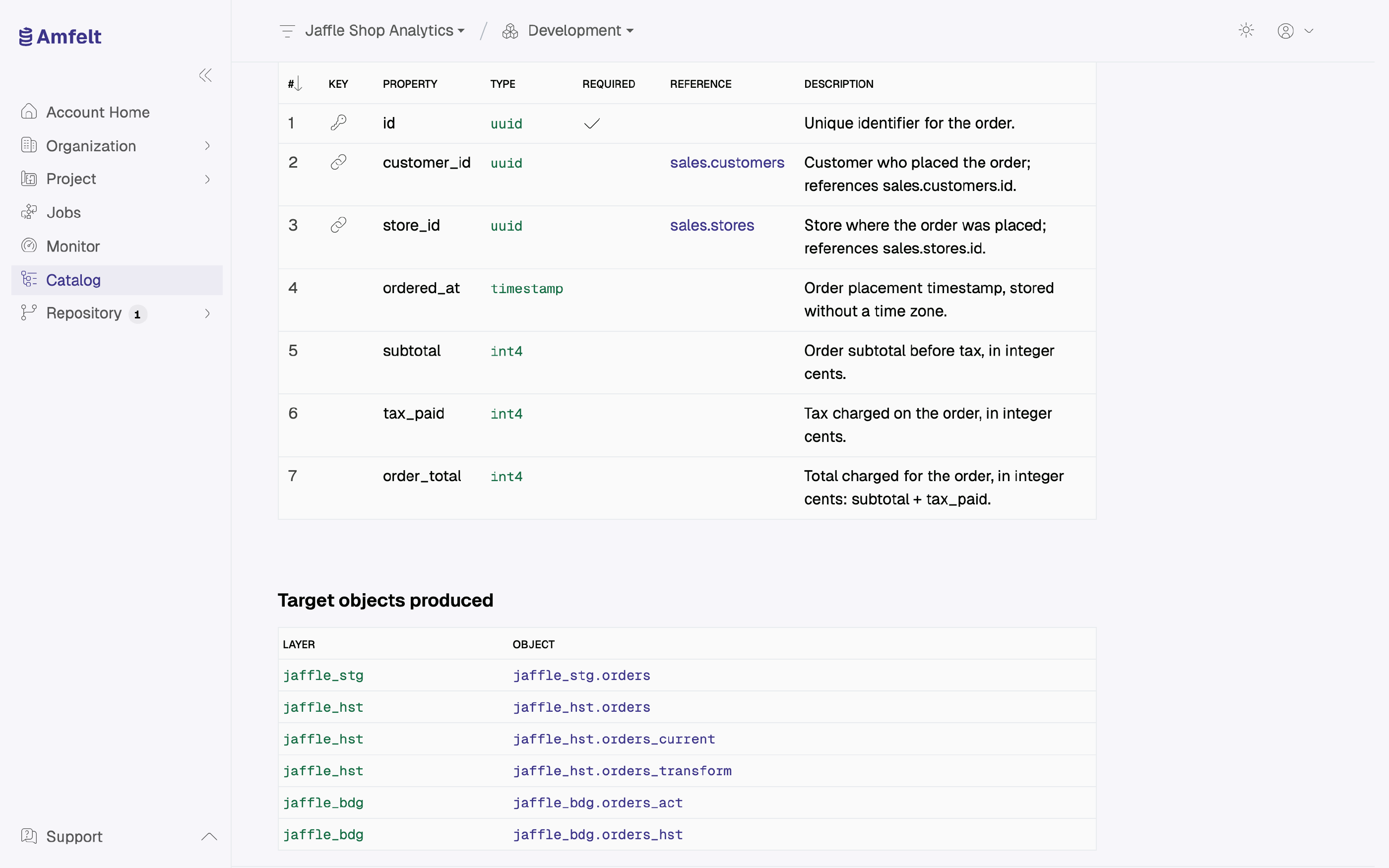
Use It Before You Change Something
This is impact analysis. Before you drop a column from a contract, retire a source, or change how an object is classified, check what depends on it. The alternative is finding out from whoever owned the dashboard that stopped working.
Use It When a Number Looks Wrong
Walk in the other direction. Start at the data platform object the report reads, follow it back to the source object that fed it, and check that source in the catalog and in its recent runs. That path is usually shorter than reasoning about it from the report.
An Empty Result Is Not an Error
If a source object shows no target objects, it has not been provisioned to a data platform yet: no job has generated its layers. That is a normal state for an object you have discovered but not yet decided to move.
Why It Stays Accurate
Lineage is generated from the contracts and from the layers Amfelt itself created, as a byproduct of doing the work. It does not depend on anyone remembering to update it, which is why it still describes reality after six months of changes.
Next
Review Schema Drift to see what has been changing underneath.
Last updated on October 31, 2026